 CutNow
How to Reverse a Video Clip and Choose What Happens to Its Sound
Reverse a selected video passage with FFmpeg. Choose no audio or backwards sound, limit memory use by trimming first, then check picture order, duration and orientation.
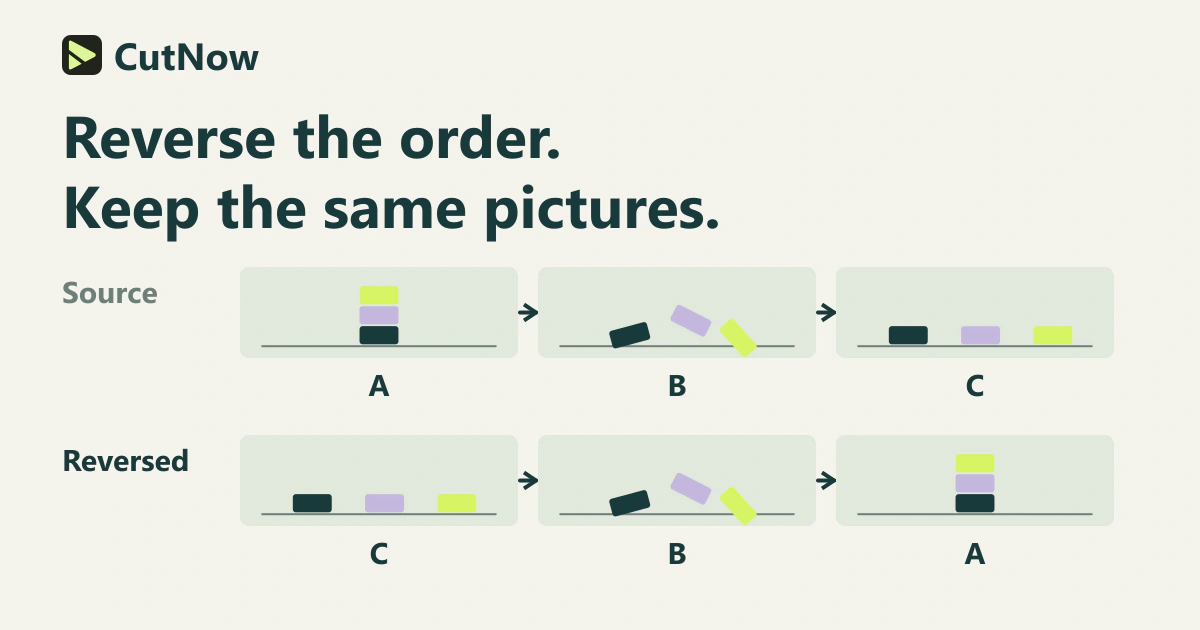
To reverse a video, select the action you want, reverse the order of its pictures, and export a new file. Decide separately whether to remove the sound or reverse it too. A reverse effect changes when a picture appears, not which side of the picture faces left.
CutNow is an AI video editor for existing footage: it finds relevant moments and organizes first cuts. That helps with the work before an effect—finding the complete action within a longer recording and putting it in the right story. Once you have chosen that passage, the method below produces a reversed version for the edit.
Choose a complete action and a sound treatment
A tower collapsing into scattered blocks makes a clear reverse shot: the blocks appear to gather into a tower. Start just before the collapse and finish after the pieces settle. Cutting off the settling moment makes the reversed opening look abrupt.
Use reversal as a visible effect, not as evidence that an event actually happened that way. Keep an unaltered source when explaining a repair, demonstration or factual sequence.
| Desired result | Picture order | Sound choice |
|---|---|---|
| A visual effect under new narration | Backwards | Remove the original audio |
| An intentionally backwards sound effect | Backwards | Reverse the same audio passage |
| Understandable spoken explanation | Backwards | Add forward narration in the edit |
Reversed speech does not become understandable narration. Keeping the old speech playing forward also breaks its original relationship to gestures and events. Choose the sound for the new shot, rather than letting export defaults choose it.

Inspect the source and limit the passage first
FFmpeg is a free, open-source option for the following local method. Use a build with the encoders in the commands. Work on a copy and choose a new output name; -n stops if that output already exists.
ffprobe -v error -show_streams -show_format -of json "source.mp4"Identify the moving video stream, audio tracks, duration, orientation and color information. The examples below assume an ordinary SDR file with a normal timeline starting at zero. They keep 12 through just before 16 seconds, about four seconds of action. Change both boundaries for your file. For a nonzero or inconsistent source timeline, establish the correct common picture-and-sound range in an editor first; do not independently shift tracks and lose their original offset.
FFmpeg's reverse and areverse filters buffer the entire passage sent to them. Therefore trim before reverse, not after it. A short time range can still need substantial memory at high resolution; there is no universal safe duration. If memory is insufficient, shorten the selected action or prepare a smaller working copy. Do not send a feature-length recording through reverse just to take four seconds afterward.
Export a reversed picture without audio
For an ordinary SDR source, this selects the first regular video stream, trims the action and exports H.264 without an audio track:
ffmpeg -n -i "source.mp4" -map "0:V:0" -vf "trim=start=12:end=16,setpts=PTS-STARTPTS,reverse,setpts=PTS-STARTPTS" -an -c:v libx264 -preset medium -crf 20 -pix_fmt yuv420p -fps_mode:v vfr "action-reversed-silent.mp4"Uppercase V excludes attached cover pictures and thumbnails. The first setpts starts the selected passage at zero; reverse changes frame order; the final setpts gives the resulting shot a zero-based timeline. FFmpeg documents that trimming alone does not reset timestamps.
-an leaves audio out. It is different from setting player volume to zero. vfr avoids forcing an arbitrary new constant frame rate; it does not promise identical frame counts for every input and output combination.
Reversal is a video filter, so this route decodes and re-encodes the picture. It is not stream copy or a lossless guarantee. CRF 20 is a teaching starting point, not a file-size target. This eight-bit SDR recipe is not an HDR-to-SDR color conversion: keep HDR material in a suitable color-managed workflow.
Reverse the same sound passage when that is intentional
If the chosen source contains an audio track and backwards sound is the intended effect, select the same range for picture and sound:
ffmpeg -n -i "source.mp4" -filter_complex "[0:V:0]trim=start=12:end=16,setpts=PTS-STARTPTS,reverse,setpts=PTS-STARTPTS[v];[0:a:0]atrim=start=12:end=16,asetpts=PTS-STARTPTS,areverse,asetpts=PTS-STARTPTS[a]" -map "[v]" -map "[a]" -c:v libx264 -preset medium -crf 20 -pix_fmt yuv420p -c:a aac -b:a 192k -fps_mode:v vfr "action-reversed-with-sound.mp4"This uses the first audio track, not every language or commentary track. Choose the intended track after inspection. An input without audio requires the silent command instead; a missing-track error is not a successful sound export.
areverse reverses samples; asetpts resets their timeline. Neither translates speech nor separates voices from music. If the selected audio has a gap or ends before the picture, settle that timing before reversing both. Avoid adding -shortest merely to hide a mismatch: it may cut off the action you selected.
Check order, duration, orientation and sound
Open the saved output, not a backwards preview of the original. Its first picture should correspond to the last included source picture, and its last to the first included picture. The block example should gather from scattered pieces into a tower. Text should still face the same way; mirrored writing points to a flip, not reversal.
The planned duration remains about four seconds at normal speed. Compare the chosen event and its endpoints, allowing for frame boundaries and audio encoding, rather than expecting every container-duration number to match exactly. Check portrait orientation in the receiving editor as well as the player. FFmpeg normally applies rotation during transcoding; an extra manual rotation can turn the picture twice.
Listen through the whole sound version. For the silent version, inspect its streams and confirm no audio stream exists. Burned-in subtitles move backwards with the pictures, and separate subtitle timing is not rebuilt by these commands. Add new explanatory captions after the reversed shot is placed.
Bring the shot back into the story
Name the export with its source range and sound choice, for example blocks-12-16-reversed-silent.mp4. Retain the original. Place the result in the first cut and judge whether the effect makes the next sentence or action clearer.
CutNow's automatic selection and first-cut role concerns finding and organizing the material; this finishing method changes the selected shot's time order. For other work, see precise time-range trimming, organizing raw footage and adding subtitles to the final edit. Explore CutNow.