 CutNow
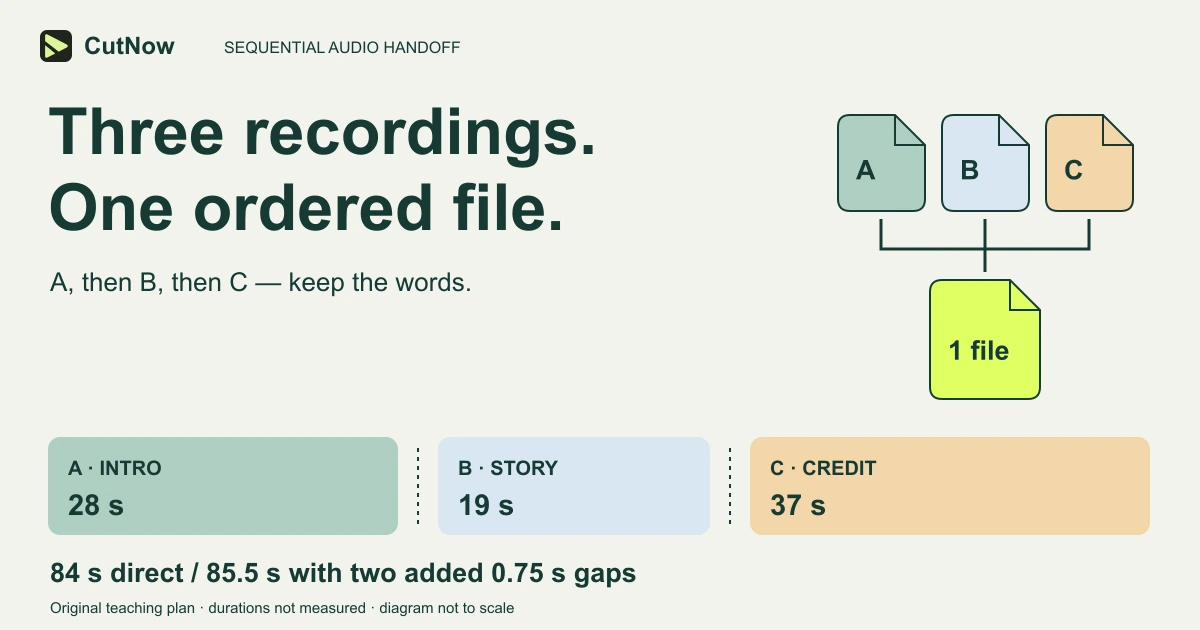
You have an introduction, a guest’s story, and a closing credit. The delivery request is one recording that plays A, then B, then C. To merge audio files successfully, agree on that order, keep complete words at each boundary, and decide whether any silence should be added before exporting one playable file.
For recordings that come from filmed sessions, CutNow works earlier in the process: it finds useful moments in existing video and organizes a first cut. After those selections are approved, a separate audio assembly can prepare a listening copy. This guide covers that downstream job with a documented audio joiner and an optional local WAV workflow; it does not assume that a video editing workflow also accepts pure audio inputs.
Choose a sequential join, not a mix
A community oral-history coordinator wants three approved recordings in one review copy. The introduction must finish the guest’s name before the story starts. The closing should begin with the credit, rather than repeat a thank-you already heard in the story. Those editorial decisions matter more than whether all three filenames end in the same extension.
| Operation | What happens in time | Is it this delivery? |
|---|---|---|
| Sequential join | A finishes, then B starts, then C; explicit gaps are optional | Yes: one continuous recording |
| Mix | Two or more sources sound at the same time | No: voice over music is a different job |
| Overlapping crossfade | A fades out while B fades in | Only if that overlap is deliberately approved |
Crossfading is useful in some music transitions. Across spoken words it can hide a consonant or make two speakers talk together. A join with no change in volume is a sensible starting point for this speech example. It does not promise that a discontinuity at an arbitrary cut will be inaudible.
Approve the source versions and count existing silence
The following files and durations are an original teaching plan, not recordings processed for this article. The durations represent the approved clips as decoded, including their retained breaths and leading or trailing silence. Keep the originals unchanged, and record the chosen source version and interval before joining.
| Order | Approved clip | Planned length | Example properties to verify | Boundary decision |
|---|---|---|---|---|
| A | A-intro.wav | 28 seconds | PCM, 44.1 kHz, mono | Finish the guest’s name |
| B | B-story.m4a | 19 seconds | AAC, 48 kHz, stereo | Keep the first breath and complete opening |
| C | C-close.wav | 37 seconds | PCM, 48 kHz, mono | Start at the credit, keep its ending |
A direct join totals 28 + 19 + 37 = 84 seconds, with joins at 28 and 47 seconds. Adding 0.75 seconds of silence at each join instead gives 85.5 seconds. These are planning calculations; actual source durations determine the exported result.
| Part | Planned position with two additional 0.75-second gaps |
|---|---|
| A | 0–28 seconds |
| Added gap | 28–28.75 seconds |
| B | 28.75–47.75 seconds |
| Added gap | 47.75–48.5 seconds |
| C | 48.5–85.5 seconds |
Ask whether “a 0.75-second pause” means additional silence or the total audible pause. If A already ends with 0.4 seconds of silence and B starts with 0.35 seconds, their direct join already contains a 0.75-second pause. Adding another 0.75 would make it 1.5 seconds. Changing the existing endpoints is a separate, approved edit; do not silently trim a breath just to match a target length.
Overlapping both joins by exactly 0.25 seconds would instead produce a planned 83.5 seconds: 84 − 0.25 − 0.25. That is not the chosen speech handoff. A fade that does not overlap clips also should not be subtracted as if it did.

Use the browser joiner for an ordinary A–B–C file
The Audio Joiner help page documents the complete add, reorder, interval, join-mode, and download sequence. Use recordings you are authorized to upload, and check the provider’s current account conditions before starting. This is one implementation example, rather than a comparison of providers or a claim that every format and file size will work.
Add the approved files. Open Audio Joiner and select Add tracks. Add A, B, and C. Check the displayed filenames before changing anything.
Set playback order. Select the track to move and use the documented Ctrl-plus-arrow controls until the order is A–B–C. Confirm the result visually; upload order alone is not your acceptance record.
Check intervals and joining modes. Keep each approved interval, or adjust the blue handles only to the agreed boundaries. Choose the mode showing no volume change at the speech joins. Check the first-track fade-in, crossfade, and final-track fade-out settings so they do not hide words. The page exposes these separately; do not assume a default is right for speech.
Create and retrieve one file. Choose the required format from the options actually displayed, click Join, wait for completion, then use Download. Reopen that saved file, not just the browser preview. If the tool cannot provide your required format or parameters, use the local method below. Do not rename an MP3 to WAV and call it a working master.
This route covers the no-added-gap plan. The documented controls do not establish an exact 0.75-second silence-insertion feature, so use an explicit editing method when that added interval matters.
Make a WAV master when exact added gaps matter
This optional route requires an existing FFmpeg and ffprobe installation; the official download page identifies distribution options. Run commands in the folder containing the approved clips. The examples below are documented instructions, not commands executed for this article.
First inspect all three files using ffprobe’s stream and format fields:
ffprobe -v error -show_entries stream=index,codec_type,codec_name,sample_rate,channels,channel_layout,duration:format=duration -of json "A-intro.wav"
ffprobe -v error -show_entries stream=index,codec_type,codec_name,sample_rate,channels,channel_layout,duration:format=duration -of json "B-story.m4a"
ffprobe -v error -show_entries stream=index,codec_type,codec_name,sample_rate,channels,channel_layout,duration:format=duration -of json "C-close.wav"
Find the intended audio stream and listen to it. A track index and its channel count describe different things: one stereo stream has two channels. The joining command selects the first audio stream in each file, written 0:a:0, 1:a:0, and 2:a:0. If another stream is intended, change the corresponding selection after checking it. An absent required stream is an error, not a reason to add an optional ? and accept an incomplete result. This example covers confirmed mono or stereo layouts; do not apply it unchanged to unknown multichannel audio.
Choose the delivery layout deliberately. Here, 48 kHz stereo accommodates B’s stereo recording. Converting mono to stereo does not create new spatial information. For an agreed mono delivery, use a deliberate downmix and listen for changed or missing content. FFmpeg’s resampler documentation covers rate conversion and channel rematrixing; those operations do not equalize perceived loudness.
Check the available encoders before exporting:
ffmpeg -hide_banner -encodersThe WAV path needs pcm_s16le; the optional MP3 path later needs libmp3lame. If the required encoder or a decoder is unavailable, resolve that or choose another documented editor. Do not treat a partial output after an error as a completed recording.
For these whole, approved clips, this command inserts two additional 0.75-second gaps:
ffmpeg -n -i "A-intro.wav" -i "B-story.m4a" -i "C-close.wav" -filter_complex "[0:a:0]aresample=48000,aformat=sample_fmts=fltp:channel_layouts=stereo,asetpts=PTS-STARTPTS[a0];[1:a:0]aresample=48000,aformat=sample_fmts=fltp:channel_layouts=stereo,asetpts=PTS-STARTPTS[a1];[2:a:0]aresample=48000,aformat=sample_fmts=fltp:channel_layouts=stereo,asetpts=PTS-STARTPTS[a2];anullsrc=r=48000:cl=stereo:d=0.75,asetpts=PTS-STARTPTS[g0];anullsrc=r=48000:cl=stereo:d=0.75,asetpts=PTS-STARTPTS[g1];[a0][g0][a1][g1][a2]concat=n=5:v=0:a=1[out]" -map "[out]" -c:a pcm_s16le "oral-history-joined-v1.wav"The graph establishes common audio parameters and zero-based timestamps, then sequences A, silence, B, silence, C. anullsrc has a finite duration here; concat=n=5:v=0:a=1 joins five audio segments into one audio stream. [out] is the mapped result. pcm_s16le writes 16-bit PCM, while -n refuses to overwrite an existing output file. Use a new versioned filename for a revision.
There is no forced 85.5-second cutoff: different real clip lengths produce a different total. This path decodes and converts audio, rather than copying compressed packets. A PCM master avoids another lossy compression generation at this stage; it does not restore information already lost in an AAC or MP3 source, and conversion to 16-bit can change samples.
Listen through the joins before making a delivery MP3
Inspect the actual WAV, using the same targeted fields:
ffprobe -v error -show_entries stream=index,codec_type,codec_name,sample_rate,channels,channel_layout,duration:format=duration -of json "oral-history-joined-v1.wav"Expect the intended single audio stream, 48 kHz stereo for this example, and a duration consistent with your actual clips plus 1.5 seconds. Metadata is not a listening test. Open this exact file in a player, check the beginning, the two gap regions, and the complete closing, then listen through the whole short recording.
At the first join, hear the full name followed by B’s opening. At the second, check that the credit has not become a repeated thank-you. Listen at one playback volume for abrupt level changes, clicks, accidental overlap, or an unexplained empty tail. Matching sample rates does not fix those symptoms. If necessary, return to the source boundary or gain adjustment in an audio editor, keep complete words, and export a revised master. Do not use a long crossfade as a substitute for deciding what should be heard.
If MP3 is requested, encode once from the checked WAV using an available LAME encoder, rather than repeatedly exporting each section as MP3:
ffmpeg -n -i "oral-history-joined-v1.wav" -map 0:a:0 -vn -c:a libmp3lame -b:a 192k "oral-history-review-v1.mp3"
ffprobe -v error -show_entries stream=index,codec_type,codec_name,sample_rate,channels,channel_layout,duration:format=duration -of json "oral-history-review-v1.mp3"
This is a lossy delivery conversion; 192k is the example bitrate, not a quality guarantee. FFmpeg documents LAME’s bitrate option and its build requirement. Reopen the saved MP3 and repeat the listening checks. Encoder delay, padding, and container duration reporting can affect a displayed duration; a number alone proves neither that a word is missing nor that it survived.
Hand over the file and the order decision
Send the agreed playback file with a short join table: source filenames and versions, approved intervals, A–B–C order, additional-gap policy, actual output positions, and format. Keep the WAV master and originals for revisions. A playlist, a project reference, or three renamed source files is not the single playable recording requested.
When the starting point is video, extracting an approved video sound track is a separate step from joining several audio files. CutNow’s video candidate finding and first-cut organization can establish which filmed passages belong together before a listening copy is assembled. For independent audio recordings, the audio methods above start directly from those files. Explore CutNow to see its existing-footage editing role and plan the video side of that workflow.