 CutNow
How to translate a video with subtitles or dubbing
Choose translated subtitles, a target-language dub or both. Prepare a video brief, follow the right workflow and deliver matching video, captions and audio.
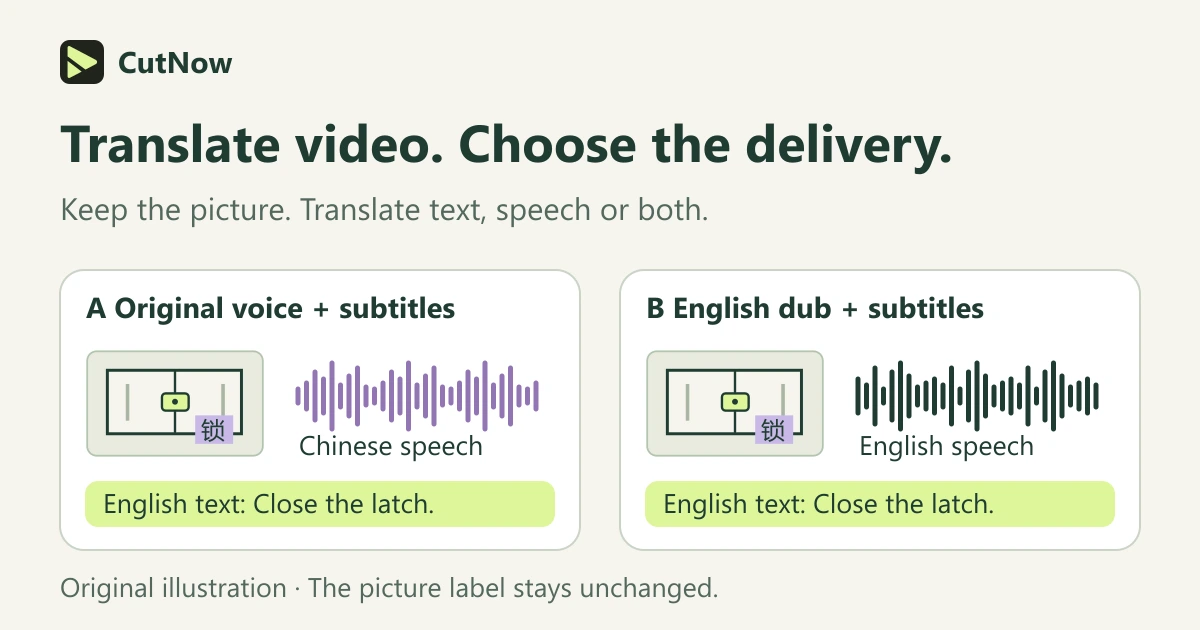
To translate a video, first choose what should change: add translated subtitles while keeping the original speech, replace the speech with a target-language dub, or deliver both the dub and matching subtitles. Keep one approved picture master, prepare the language brief, review the translation against the video, and export the files your destination actually needs.
CutNow is an AI video editing product for footage you already have. Its localization workflow connects translated speech, corresponding subtitles and video delivery around the existing edit. The editor takes over to approve meaning, check action timing and confirm the release files. The Chinese-to-English example below shows that connected handoff.
Choose subtitles, dubbing or a localized release
Subtitle translation changes the readable text while retaining the original speech. Dubbing changes the spoken language. Video localization is the wider release task: it can also involve picture text, units, names, titles and destination-specific delivery.
| Viewing task | What the audience gets | Files to request |
|---|---|---|
| Read the translation and hear the original speaker | Original speech plus translated text | Original-language video and target-language timed subtitles; a captioned MP4 if required |
| Follow the video by listening | Target-language speech over the existing pictures | Dubbed MP4, or a separate audio track for a destination that accepts it |
| Listen in the target language and also read | Target-language dub plus matching subtitles | Dubbed MP4, matching SRT and separate audio when needed |
For a narrated demonstration, dubbing helps the viewer keep watching the hands instead of reading every instruction. An interview may suit translated subtitles when hearing the original speaker matters. Choose from the viewing task; a subtitle file itself does not change the voice.
Make the choice before asking an AI video translator to process the file. “Translate this video” leaves the sound unspecified. A useful request is “Keep the Chinese speech and add English subtitles” or “Deliver English speech and matching English subtitles.” If both audiences need access, request the original and localized versions separately rather than mixing their audio accidentally.
Also choose how subtitles should appear. A separate SRT needs a compatible player or platform import. A selectable subtitle track can be turned on and off in a supporting player. Burned-in text is part of the picture. Request that last option when the delivery must show text without a caption setting; keep an editable subtitle copy for corrections.

Lock the picture edit and write the brief
Start from the approved picture master. Note the source language, target language and regional usage, intended audience, pronunciation of names and any terms that must remain consistent. Confirm the requested language and voice before commissioning the version; the checked CutNow example here establishes a Chinese-to-English delivery.
Mark speech, music and meaningful sounds separately in the brief. A click that confirms a latch has closed matters differently from background music. Decide which sounds should remain and who will prepare the final mix. Also list words already inside the picture: replacing speech does not replace a label on a photographed package.
Keep the video with its full start, pauses and ending; a shorter audio excerpt cannot define timing for the whole release. If you have an approved transcript or source captions, supply them as reference along with corrections to names and unclear speech. With only burned-in captions, include the clean master or editable text if available: text already in the pixels cannot be replaced by editing an SRT.
Copy this brief and replace the example values before handing the project to a translator or editor:
Picture master: assembly_master_v02.mp4; picture edit locked
Source / target: Chinese / English for US first-time users
Delivery: English dub + matching English SRT + MP4
Terms: latch; alignment mark; product names unchanged
Meaning: keep “gently” and “stop when it clicks”
Sound: replace dialogue; confirm click/music treatment with mixer
Picture text: list labels that still need separate adaptation
Destination: standalone video; selectable subtitles + separate SRT
Reviewer: target-language editor; corrections tied to picture times
Fit translated speech to visible actions
Consider an original teaching example: hands align two marks, tighten a part, then close a latch. The source instruction is “先对齐标记,再轻轻拧紧;听到咔嗒声就停。” An English rendering is “Line up the marks, then tighten gently. Stop when it clicks.”
Keep “line up” beside the alignment, “gently” with the tightening, and the stopping instruction close to the latch event. These are action anchors, rather than a demand that every translated word occupy its source word’s position.
If a sentence crowds the next action, shorten the wording while keeping its condition, or split it at a natural pause. Listen again against the unchanged pictures. Moving the instruction far ahead of the action can confuse the demonstration even when the translation is accurate.
Prepare the voice and matching subtitles
Approve meaning before finalizing the spoken delivery. Read names, numbers and warnings aloud, then check them against the image. Voice identity and mouth matching are separate requirements to confirm when relevant; a translated voice alone does not establish either.
With the target-language speech approved, time the matching subtitles to that version. A translation timed to the original speech can drift after the new speaker changes pauses.
Decide how the original dialogue will be handled. Fully replacing speech and keeping a quieter original voice underneath create different listening experiences. Ask for the intended result explicitly, including the meaningful sounds identified earlier.
Path A: keep the original speech and translate the subtitles
- Prepare or correct the source transcript while watching the locked video. Resolve unclear names and numbers before translation.
- Translate for the intended audience, using the brief and visible actions as reference. Review the target text with a fluent reviewer.
- Set the target subtitles against the original speech and picture timing. Shorten crowded captions without removing a warning or condition.
- Deliver the target-language subtitle file with the original-speech video, then check display in the intended player. Request a captioned video separately if the destination needs text in the picture.
This path changes readable language. It does not create a spoken target-language track. For the detailed text review, start with the subtitle preparation guide.
Path B: create target-language speech, then matching captions
- Approve the translated spoken script against the picture master and terminology brief.
- Record or generate the requested target-language speech. Listen for pronunciation, missing conditions and phrases that run past the next action.
- Confirm the dialogue replacement and background-sound mix, then time captions to that final voice version.
- Export the dubbed video, matching subtitles and the independent audio if required. Review those exports together rather than mixing files from different revisions.
The YouTube caption instructions explain timed-file import; its transcript auto-sync expects text in the language spoken in the video. Uploading translated text is not a substitute for generating a dub.
What a checked CutNow delivery shows
The checked CutNow example used an original Chinese tutorial and delivered English video, subtitles and audio. The picture timing was checked against the source, and the subtitles and dubbed audio were confirmed to belong to the same video version. The embedded subtitle text matched the separate SRT, and the MP4 and M4A contained the same dubbed audio. The embedded subtitles were selectable text, rather than text burned into the image.
That is a concrete automation result: the editor receives a coordinated video, voice and timed-text package, then reviews the language and the viewer’s understanding. For the English-specific preparation and file relationship, continue with translate a video to English.
Use that relationship when reviewing your own files: open the exported video, select its subtitle track if present, and compare it with the sidecar SRT. Listen to the separate audio at the opening, an action boundary and the ending. These checks catch an old subtitle revision or the wrong voice file before the package reaches a publisher.
Package the version for its destination
Choose the package from the publishing destination. A standalone localized MP4 includes the pictures and new speech together. A separate dubbed audio file serves a different handoff, such as adding a language track to an existing published video.
YouTube’s multilingual audio guidance distinguishes uploading your prepared dub from automatic dubbing, and asks for an audio-only file roughly as long as the video. Check the current destination requirements before delivery.
Use a shared stem such as assembly_en_v02 for the MP4, SRT and M4A. Record which picture master it matches, whether subtitles are separate or embedded, and which picture labels still need adaptation. If the cut changes, update the affected voice and captions together. For audio-only handoff choices, see extract audio from video.
| Example handoff file | Purpose | Must match |
|---|---|---|
assembly_en_v02.mp4 | English dubbed picture release | The approved picture master and final voice |
assembly_en_v02.srt | Editable timed English text | The voice version and full release timing |
assembly_en_v02.m4a | Independent English audio handoff | The MP4 audio and intended start/end |
Those filenames illustrate a delivery convention. For a subtitle-only release, keep the original-speech master and identify the SRT as the English subtitle file in the handoff note. The same language code does not mean the video contains English speech.
For YouTube captions, import a supported timed file for the target language and choose the timed-file option. Basic SRT should be plain UTF-8; YouTube’s supported-format guide says SRT styling is not retained. Check caption appearance in the destination instead of assuming local formatting will transfer.
Review what the audience will hear and see
Listen without relying on subtitles: can someone follow each instruction? Then watch with sound muted: do captions preserve the actions and their conditions? Finally inspect picture text, names and units for the intended audience.
Check the opening, each action boundary and the ending, then play the entire exported version in its destination player. Confirm that the intended subtitles display and that the independent audio belongs to this cut. Keep a correction list tied to visible moments so a collaborator can revise the right line.
| Symptom | Inspect | Correction |
|---|---|---|
| The video still speaks the source language | Was this a subtitle-only delivery? Which audio track is selected? | Select or request the target-language dub; an SRT alone cannot change speech. |
| Subtitles are missing | Caption setting, imported language and sidecar association | Enable/import the right file; use a captioned render if the destination cannot show selectable text. |
| Timing drifts later in the video | Picture revision, changed pauses, omitted introduction | Return to the matching master and retime affected cues. A constant offset cannot fix a changed edit. |
| Two voices compete | Original dialogue, new dub and requested mix | Correct the dialogue mix while checking useful sounds separately. |
Write corrections as “at the latch close, the stop instruction arrives late,” with a picture time and desired wording. After a revision, repeat the affected section and the complete-file review so the MP4, subtitles and audio stay together.
Bring an approved master, a terminology list and a clear delivery choice to your next localization brief. Explore CutNow.
By the CutNow team. Prepared with AI assistance and editorial review.